Export Threads Followers, Following & Posts to CSV
Export any public profile's followers, following, and posts straight to CSV or JSON — right from the Threads page. No account. No upload.
Add to Chrome — It's FreeOn a phone? The extension needs desktop Chrome. Export followers right here in your browser →
Free plan covers standard exports — unlimited in the extension from $7.99/mo →
Export Followers & Following
Download complete follower lists and following lists from any public profile. Perfect for audience analysis and research.
Export User Posts
Export all posts from any public Threads user. Navigate to their profile and click "Export Posts" to download their entire timeline.
Export Home Feed & Search
Export your personalized home feed or any search results page. Capture trending content and research topics instantly.
Multiple Export Formats
Choose from JSON or CSV formats. Your export file is built and saved locally in your browser. CSV opens directly in Excel or Google Sheets.
How It Works
Install the Extension
Click "Add to Chrome" and install Threads Exporter from the Chrome Web Store in seconds.
Open Any Public Profile's Followers
Visit a Threads profile, your home feed, or a search page. The extension works on any public page on threads.net.
Click Export & Pick a Format
Hit the "Export Followers", "Export Posts", or "Export Following" button on the page, choose CSV or JSON, and the file downloads instantly — the extension auto-scrolls the full list for you.
Free & Pro Plans
Free — $0
20 posts, 250 followers & 250 following per profile · CSV, JSON, Excel · no credit card.
Extension Pro — $7.99/month
Unlimited posts, followers, following, feed & search exports in the extension · priority support · cancel anytime.
Compare plans →Prefer to Ask Claude Instead?
PostCopilot also speaks the Model Context Protocol, so Claude can do this work for you in a chat. Ask for a profile and Claude runs a real export on our servers — no browser open, no Threads login of your own — then pages, filters and sorts the rows without you touching a CSV.
It is set up on the website, not in the extension: sign in with Google, press Create my connector, paste one URL into Claude. Nothing to install and no credit card. Free: 3 server-side exports a day, up to 20 posts or 100 followers each, plus 10 video downloads. A $2 24-hour day pass or Queue Pro at $39.99/month — the same plan with a different clock — lifts every limit.
The two are for different jobs, and neither replaces the other: this extension exports on your own logged-in session, in your own browser, which is the only way to reach your home feed or your own search results. The connector exports on our shared session, with nothing open on your machine.
How the Claude connector works →See It In Action
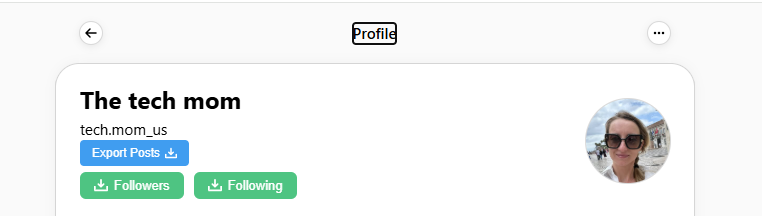
Export From Profile
Export buttons appear directly on any public Threads profile. One-click access to posts, followers, and following lists.
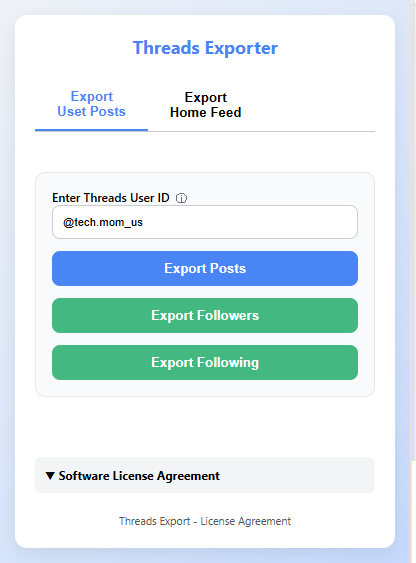
Extension Popup - User Export
Enter any Threads username to export their posts, followers, or following from the extension popup.
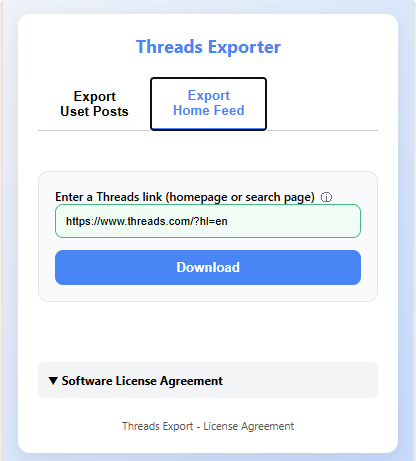
Extension Popup - Feed & Search
Export your home feed or any search results page by pasting the URL directly into the extension popup.
What Can You Do With Exported Data?
Once you've exported your Threads followers to CSV, you can analyze audience demographics, find potential collaborators, or build targeted outreach lists. Pair this with our AI Threads generator to create content that resonates with your specific audience.
Want to save individual posts instead? Use the Threads post downloader to extract text and media from any profile. For video content, our free Threads video downloader lets you save reels and clips in MP4 format instantly.
Frequently Asked Questions
Is the Threads Exporter extension free?
Yes, the Free plan lets you export posts, followers, following, home feed, and search results at no cost — no credit card required. For unlimited exports, you can upgrade to Pro.
How do I export Threads followers to CSV?
Navigate to any public Threads profile, click the "Export Followers" button that appears on the page, and select CSV as your format. The extension scrolls through the follower list and downloads a complete CSV file with usernames and profile info.
Does the extension work with private profiles?
The extension can only export data from public profiles and pages you have access to while logged in. If a profile is private, follower/following lists won't be accessible.
Is my data safe? What does the extension send to your server?
Your exported data — the actual list of followers, posts, etc. — is built and saved entirely in your browser. The exported file is never uploaded anywhere. The extension does send anonymous usage metadata (which export type ran, total counts, the target profile name) so we can monitor service health and prevent abuse; individual follower or post records are not transmitted. No login credentials are ever sent to PostCopilot.
What export formats are supported?
Threads Exporter supports JSON and CSV formats. JSON is best for developers, and CSV opens directly in Excel or Google Sheets.
What should I look for in a Threads exporter Chrome extension?
Four things matter: (1) data scope — does it cover followers, following, posts, home feed, and search results, or just one of these? (2) export formats — CSV and JSON are the useful ones. (3) where the data is processed — local-only is safer than cloud upload. (4) cost — most exporters offer a free tier for individual use. Threads Exporter by PostCopilot covers all four, runs locally in your browser, and is free to start.
How do I export a Threads followers list with one click?
After installing the extension, visit any public Threads profile on threads.net. An Export Followers button appears overlaid on the page. Click it, pick CSV or JSON, and the extension auto-scrolls the full follower list and saves the file to your downloads folder. No manual scrolling, no copy-pasting, no rate-limit babysitting.
Can the Threads Exporter extension export following lists too?
Yes — the extension exports both followers and following lists, plus posts, home feed, and search results. Each export type uses the same one-click flow and the same format options (CSV, JSON). You can run multiple exports in sequence to build a complete dataset of any profile.
More Free Threads Tools
Threads Follower Export (No Extension)
Export followers & following directly in your browser — nothing to install
AI Threads Post Generator
Generate viral Threads posts in any creator's style with AI
Threads Video Downloader
Download Threads videos in MP4 — one click, no signup
Fake Threads Post Maker
Create realistic fake Threads screenshots for mockups
Threads MCP Connector for Claude
Ask Claude to export a Threads profile — the scrape runs on our servers